Guide to SenseOps Newest Announcements 2025
Posted on 26th Dec, 2025 | By Admin
The 2025 SenseOps updates focus on enhancing how teams deploy, manage, and operate Qlik applications. Introduced a broad set of capabilities designed to remove regular friction around deployments, versioning, writeback, visualization, and much more.
Top Themes in 2025 Enhancements
1. Operational Governance
2. Workflow Automation
3. Extended Data Workflows
4. Rich Visualization
Listed below are the major keynote enhancements released in 2025. To know more about the upcoming releases, you can check this page.
1. Safer Deployments as Teams Scale
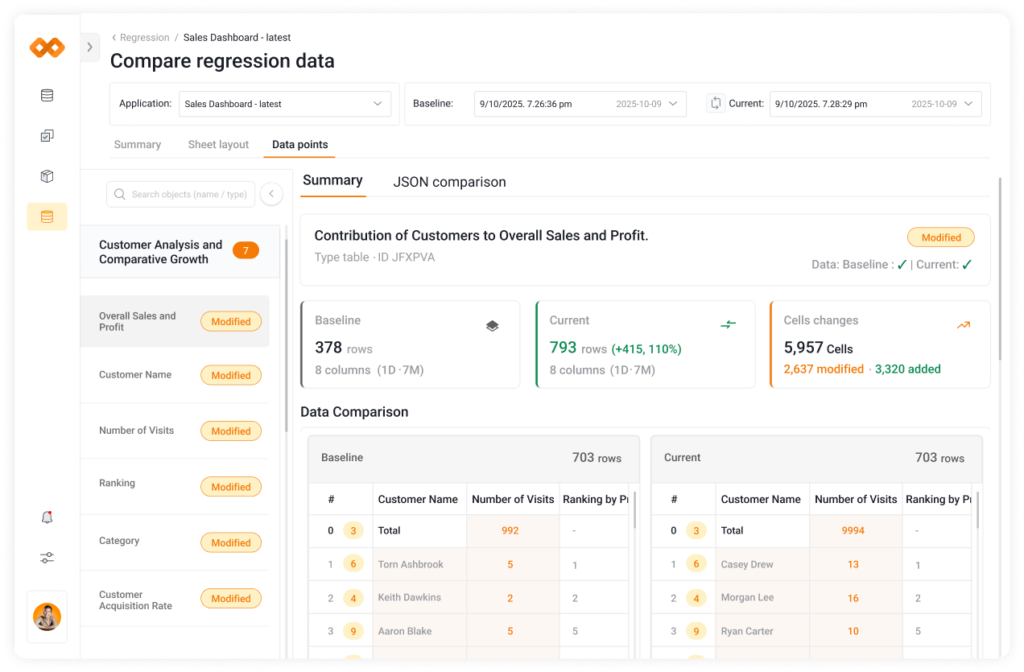
As more developers contribute to Qlik apps, small unintended changes can have an impact across environments. With SenseOps Automated Regression Testing, now your teams safely ship Qlik apps by comparing versions against a baseline to see how changes impact data, visuals, layouts, and performance. It is flexible to run tests manually or in deployment pipelines, with alerts raised early when regressions are detected.
2. Built-In Quality Checks
Built-in QA checks added into deployment workflows to validate scripts and expressions when apps move across environments, helping teams detect discrepancies before they reach production.
3. ITSM-Integrated Deployment Tracking
For organizations with structured IT processes, deployments can also be triggered and tracked through ITSM tools like Jira, ServiceNow & others. Supporting to align Qlik changes with existing approval and audit workflows without adding extra overhead.
4. Asset-Level Versioning for Faster Recovery
Most teams encounter complexity in versioning as apps evolve and assets are reused across projects. Rolling back an entire app to recover a single sheet or story won’t be a good choice anymore.
So, we expanded versioning beyond apps to individual assets. Sheets, stories, and bookmarks can now be backed up and restored independently, with automatic repository versioning and scheduled backups running in the background. Qlikkies can now fix mistakes quickly and precisely by undoing unrelated work or interrupting users.
5. Optimize App Size During Deployment
Many Qlik environments rely on similar apps or jobs running repeatedly across regions, customers, or departments. Managing these variations manually doesn’t scale well.
Introduced Loop and Reduce to Code Management, letting you automatically split a Qlik Sense app into smaller, targeted versions during deployment based on a chosen dimension (like region or business unit).
It lets the team get only the data they need without manual effort or duplicate apps. Resulting in faster load times, lower memory usage, better user experience, and more efficient deployments. Read more in our blog post.
6. Advanced Writeback Capabilities Across Platforms
When working with high-concurrency or audited environments, Writeback introduces Write-Write conflict. To avoid this, SenseOps introduced a row-level locking functionality.
It is used when multiple users work on the same writeback table at once. As soon as one user starts editing a row (for example, updating a forecast value or approving a record), that row is automatically locked for others. This prevents overwrites, ensures accountability, and allows teams to confidently update live data in Qlik Sense without coordination issues or follow-ups. To watch the live demo video, check out the blog post.
In addition to row-lock functionality, bulk edits and history tracking (record and store every edit as a separate entry) capabilities are available in both SaaS and Enterprise deployments. Expanded support given for databases such PostgreSQL, Oracle, Fabric Warehouse, and REST API integrations. Visit the documentation for working with SenseOps Writeback.
7. Supporting SaaS and Multi-Tenant Architectures
Added a multi-tenant support and improved database-level visibility into active tenant connections. This helps teams manage shared infrastructure and maintain a clear separation between tenants, whether they are internal business units or external customers.
8. Expanding Visualization
Added several new chart types, including Line, Sankey, Calendar, Gauge, and Decomposition tree charts. Usability enhancements also included for flexible views. For instance: Customizable brush ranges in combo charts, give analysts more control without complicating dashboards. Know more about Extensions.
At the same time, the extension framework was migrated to Qlik Embed to improve stability and long-term compatibility.
9. Pixel-Perfect Reporting Across Channels
Pixel reports are now possible with SenseOps Alerting. It supports consolidating multiple sheets into a single, pixel-perfect PDF, including in SaaS environments. Also, alerts can include rich attachments such as images, PDFs, and Excel files and be delivered through channels like Microsoft Teams and WhatsApp.
Trigger actions on reload and live tracking make alert workflows easier to trust, while storytelling exports to PPT and PDF help teams share insights without recreating content manually. Get started with SenseOps Alerting.
10. Technical Documentation
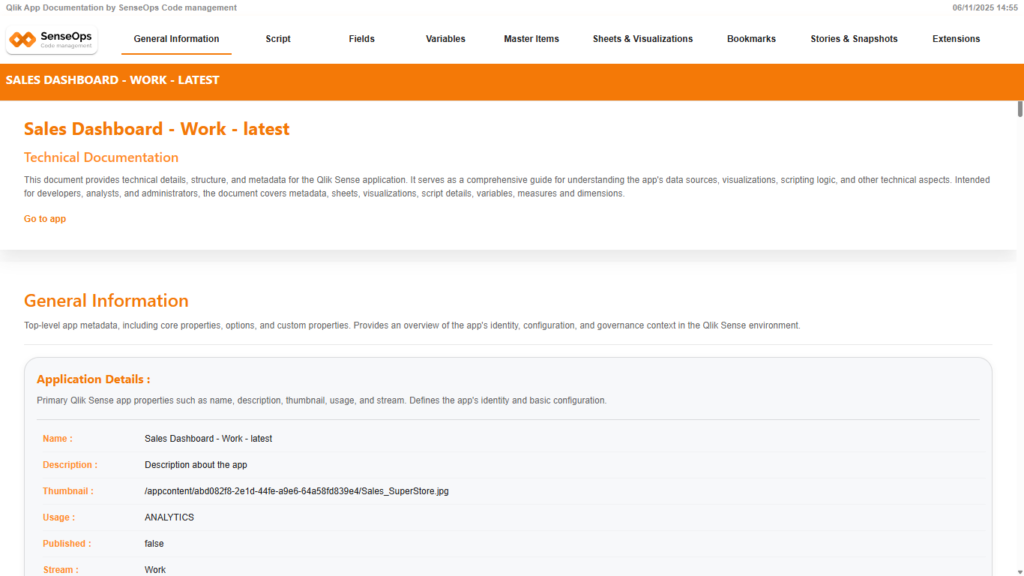
Introduced automatic technical documentation generation for each Qlik Sense version post-production.
Conclusion
The 2025 SenseOps updates are about making everyday Qlik operations smoother. Deployments feel safer, recovery is simpler, writeback is more dependable, and reporting workflows require less manual effort.
For teams already running Qlik at scale, these enhancements remove friction allowing more time to be spent on analysis and decision-making.
To learn more, book a demo or sign up here to explore our marketplace and start your
FREE trial today!